Skip to Content

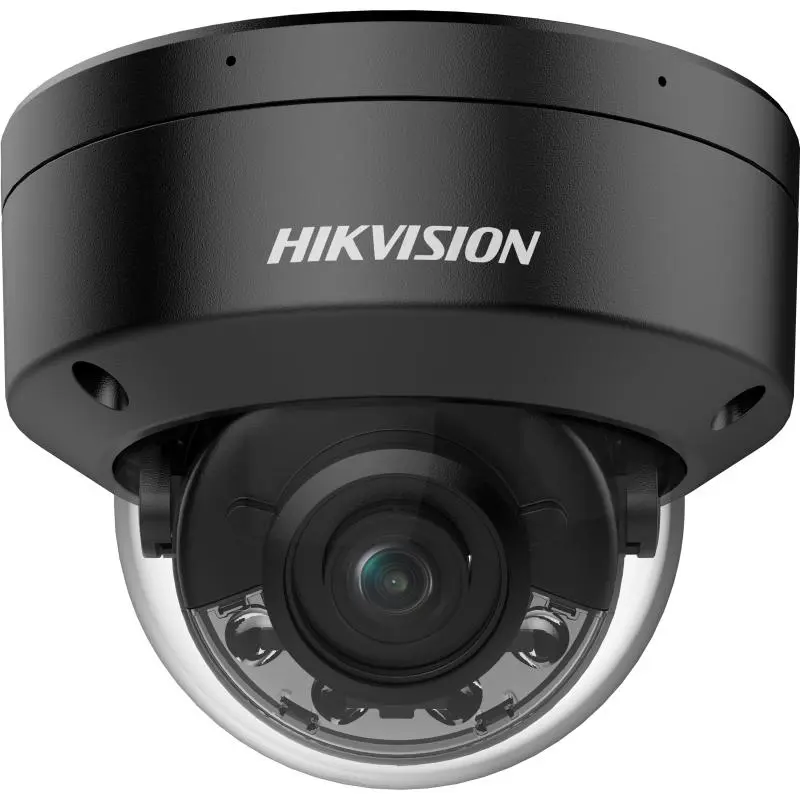
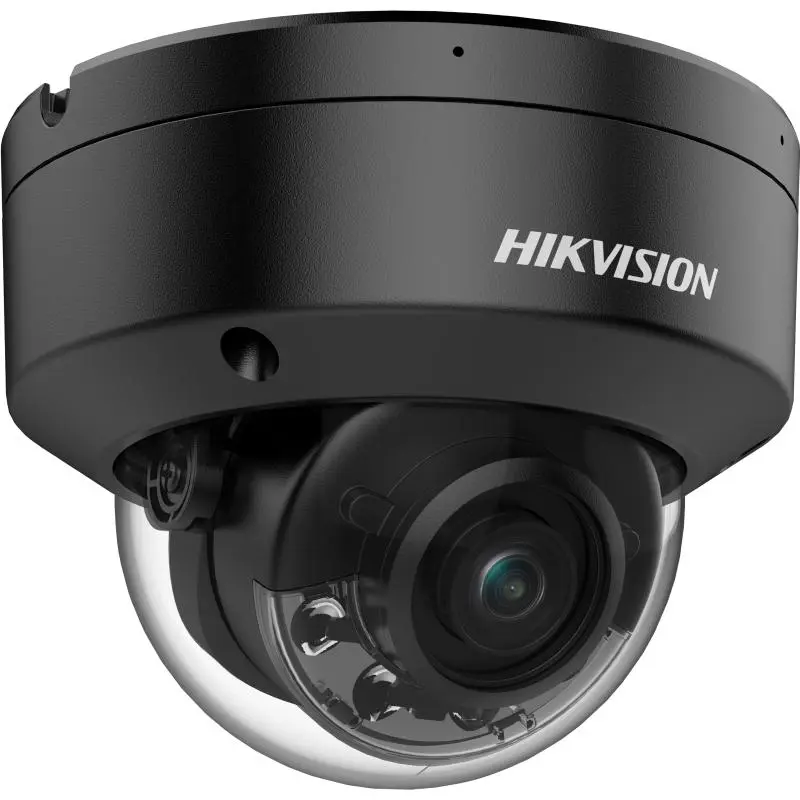
Hikvision DS-2CD2187G2H-LI 8MP ColorVu Smart Hybrid Light Mini Dome IP Camera, 2.8mm, 130dB WDR

  • High quality imaging with 8 MP resolution
  • Smart Hybrid Light: advanced technology with long range
  • Clear imaging against strong back light due to 130 dB WDR technology
  • Efficient H.265+ compression technology
  • Focus on human and vehicle classification based on deep learning
  • -U: Built-in microphone for real-time audio security
  • Water and dust resistant (IP67) and vandal-resistant (IK10)
Price
⃁ 560.00 ⃁ 560.00 ⃁ 700.00
(Tax excluded)
  • Delivery within 2–5 business days across Saudi Arabia
  • Warranty according to the manufacturer
  • Tax invoice with every order
  • Technical support before and after purchase

Not sure this model fits your setup? Read the buying guide

Technical Specifications – DS-2CD2187G2H-LI (2.8mm)

Camera

Image Sensor1/1.8" Progressive Scan CMOS
Max. Resolution3840 × 2160
Min. IlluminationColor: 0.0005 Lux @ (F1.0, AGC ON),0 Lux with light
Shutter Time1/3 s to 1/100,000 s
Day & NightIR cut filter
Angle AdjustmentPan: 0° to 355°,tilt: 0° to 75°,rotate: 0° to 355°

Lens

Lens TypeFixed focal lens, 2.8 and 4 mm optional
Focal Length & FOV2.8 mm, horizontal FOV 105.1°, vertical FOV 54.8°, diagonal FOV 128.2° 4 mm, horizontal FOV 90.0°, vertical FOV 45.8°, diagonal FOV 109.4°
Lens MountM16
Iris TypeFixed
ApertureF1.0
Depth Of Field2.8 mm: 3.3 m to ∞ 4 mm: 3.8 m to ∞

Pixel Density

DORI2.8 mm: D: 89 m, O: 35 m, R: 17 m, I: 8 m 4 mm: D: 109 m, O: 43 m, R: 21 m, I: 10 m

Illuminator

Supplement Light TypeIR,White Light
Supplement Light RangeUp to 30 m
Smart Supplement LightYes
IR Wavelength850 nm

Video

Main Stream50 Hz: 25 fps (3840 × 2160, 3200 × 1800, 2688 × 1520, 1920 × 1080, 1280 × 720) 60 Hz: 24 fps (3840 × 2160) 30 fps (3200 × 1800, 2688 × 1520, 1920 × 1080, 1280 × 720)
Sub-Stream50 Hz: 25 fps (1280 × 720, 640 × 480, 640 × 360) 60 Hz: 30 fps (1280 × 720, 640 × 480, 640 × 360)
Third Stream50 Hz: 10 fps (1920 × 1080, 1280 × 720, 640 × 480, 640 × 360) 60 Hz: 10 fps (1920 × 1080, 1280 × 720, 640 × 480, 640 × 360) *Third stream is supported under certain settings.
Video CompressionMain stream: H.265/H.264/H.264+/H.265+, Sub-stream: H.265/H.264/MJPEG, Third stream: H.265/H.264, *Third stream is supported under certain settings.
Video Bit Rate32 Kbps to 16 Mbps
H.264 TypeBaseline Profile,Main Profile,High Profile
H.265 TypeMain Profile
Bit Rate ControlCBR,VBR
Scalable Video Coding (SVC)H.264 and H.265 encoding
Region Of Interest (ROI)1 fixed region for main stream and sub-stream

Audio

Audio Compression-U: G.711/G.722.1/G.726/MP2L2/PCM/MP3/AAC-LC
Audio Type-U: Mono sound
Audio Bit Rate-U: 64 Kbps (G.711ulaw/G.711alaw)/16 Kbps (G.722.1)/16 Kbps (G.726)/16 Kbps to 64 Kbps (AAC-LC)/32 to 192 Kbps (MP2L2)/8 to 320 Kbps (MP3)
Audio Sampling Rate-U: 8 kHz/16 kHz/32 kHz/44.1 kHz/48 kHz
Environment Noise Filtering-U: Yes

Network

ProtocolsTCP/IP, ICMP, HTTP, HTTPS, FTP, DHCP, DNS, DDNS, RTP, RTSP, RTCP, NTP, UPnP, SMTP, IGMP, 802.1X, QoS, IPv4, IPv6, UDP, Bonjour, SSL/TLS, PPPoE, SNMP, WebSocket, WebSockets, SRTP, SFTP
Simultaneous Live ViewUp to 6 channels
APIOpen Network Video Interface (Profile S, Profile G, Profile T),ISAPI,SDK,ISUP
User/HostUp to 32 users 3 user levels: administrator, operator, and user
SecurityPassword protection, complicated password, HTTPS encryption, 802.1X authentication (EAP-TLS, EAP-LEAP, EAP-MD5), watermark, IP address filter, basic and digest authentication for HTTP/HTTPS, WSSE and digest authentication for Open Network Video Interface, RTP/RTSP over HTTPS, control timeout settings, security audit log, TLS 1.1/1.2/1.3, host authentication (MAC address)
Network StorageNAS (NFS, SMB/CIFS),Auto Network Replenishment (ANR), Together with high-end Hikvision memory card, memory card encryption and health detection are supported.
ClientiVMS-4200,Hik-Connect,Hik-Central
Web BrowserPlug-in required live view: IE 10, IE 11, Plug-in free live view: Chrome 57.0+, Firefox 52.0+, Edge 89+, Local service: Chrome 57.0+, Firefox 52.0+, Edge 89+

Image

Image Parameters SwitchYes
Image SettingsRotate mode,saturation,brightness,contrast,sharpness,gain,white balance,adjustable by client software or web browser
Day/Night SwitchDay,Night,Auto,Schedule
Image EnhancementBLC,HLC,3D DNR
SNR≥ 52 dB
Wide Dynamic Range (WDR)130 dB
Privacy Mask4 programmable polygon privacy masks

Interface

Ethernet Interface1 RJ45 10 M/100 M self-adaptive Ethernet port
On-Board StorageBuilt-in memory card slot, support microSD/microSDHC/microSDXC card, up to 512 GB
Built-In Microphone-U: Yes
Audio-S: 1 input (line in), two-core terminal block, max. input amplitude: 3.3 Vpp, input impedance: 4.7 KΩ, interface type: non-equilibrium, 1 output (line out), two-core terminal block, max. output amplitude: 3.3 Vpp, output impedance: 100 Ω, interface type: non-equilibrium
Alarm-S: 1 input, 1 output (max. 12 VDC, 30 mA)
Reset KeyYes

Event

Basic EventMotion detection (support alarm triggering by specified target types (human and vehicle)),video tampering alarm,exception
LinkageUpload to FTP/NAS/memory card,notify surveillance center,trigger recording,trigger capture,send email
Smart EventScene change detection

Deep Learning Function

Face CaptureYes
Perimeter ProtectionLine crossing, intrusion, region entrance, region exiting Support alarm triggered by specified target types (human and vehicle)

General

Power12 VDC ± 25%, 0.66 A, max. 8 W,Ø5.5 mm coaxial power plug,reverse polarity protection, PoE: IEEE 802.3af, Class 3, max. 9.5 W
MaterialBase: aluminum alloy, cover: aluminum alloy
DimensionØ121.5 mm × 97.6 mm (Ø4.78" × 3.84")
Package Dimension150 mm × 150 mm × 141 mm (5.91" × 5.91" × 5.55")
WeightApprox. 525 g (1.16 lb.)
With Package WeightApprox. 750 g (1.65 lb.)
Storage Conditions-30 °C to 60 °C (-22 °F to 140 °F). Humidity 95% or less (non-condensing)
Startup And Operating Conditions-30 °C to 60 °C (-22 °F to 140 °F). Humidity 95% or less (non-condensing)
General FunctionHeartbeat,mirror,password reset via email,pixel counter,anti-banding

Approval

EMCCE-EMC: EN 55032: 2015, EN 61000-3-2:2019, EN 61000-3-3: 2013+A1:2019, EN 50130-4: 2011 +A1: 2014, IC: ICES-003: Issue 7, KC: KN32: 2015, KN35: 2015, RCM: AS/NZS CISPR 32: 2015
SafetyUL: UL 62368-1, CB: IEC 62368-1: 2014+A11, CE-LVD: EN 62368-1: 2014/A11: 2017, BIS: IS 13252 (Part 1): 2010/IEC 60950-1: 2005
EnvironmentCE-RoHS: 2011/65/EU, WEEE: 2012/19/EU, Reach: Regulation (EC) No 1907/2006
ProtectionIP67: IEC 60529-2013,IK10: IEC 62262:2002

Source: Hikvision official website. Specifications are subject to change by the manufacturer.

PRACTICAL ANSWERS

Camera and recording questions

How do I choose a camera for an entrance?

Describe the entrance width, mounting height, distance to the subject and available lighting. Decide whether you need an overview or identifiable detail, then compare the exact lens and image specifications of the proposed model.

Will a new camera work with my existing recorder?

Check the camera and recorder model numbers, connection type, supported video formats and recording limits together. Do not rely on brand names alone; ask for confirmation against both devices’ documentation before ordering.

How much recording storage will I need?

Prepare the number of cameras, desired retention period, recording schedule and proposed image settings. Ask for a storage estimate based on these inputs and an allowance for variation; a disk capacity alone does not guarantee a fixed number of days.

What should I check for outdoor camera installation?

Review the model’s documented environmental rating and operating conditions, then plan sheltered connections, suitable cable routes and a serviceable mounting point. Installation details should be confirmed for the actual location, not inferred from the camera’s appearance.

Can I view the cameras from a phone?

Check which app and remote-access method the model supports, whether an account or subscription is required, and the internet requirements at the site. Plan individual user access and secure account settings rather than sharing an administrator password.

What should be tested when a camera system is handed over?

Review the intended views, playback and export, date and time, user permissions and any agreed remote access. Request the equipment list and configuration handover, and record outstanding issues before accepting the installation.